

Download Ghost Browser – Boost Productivity with a Multi‑Account Web Tool
Overview
Ghost Browser is a purpose‑built web browser that puts productivity front‑and‑center. Unlike traditional browsers such as Chrome, Firefox, or Safari, Ghost introduces a persistent workspace sidebar that lets you organize daily tasks, group related web pages, and keep login sessions completely isolated. The result is a smoother workflow, fewer tab‑overload headaches, and the ability to manage multiple social‑media or business accounts without ever opening a second window.
Whether you’re a digital marketer juggling three Facebook ad accounts, a developer testing several staging environments, or a remote worker who needs quick access to project folders, Ghost Browser’s color‑coded tabs and cookie‑sandboxing eliminate the friction that slows you down. The browser is built on Chromium, so you retain the speed and compatibility of the Chrome engine while gaining a set of unique productivity tools designed for today’s fast‑paced work life. Its focus on organization, secure multi‑login handling, and a side‑panel that never disappears makes Ghost Browser a compelling free (with optional paid upgrades) alternative for anyone looking to reclaim time and reduce the stress that comes from chaotic browsing habits.
Key Features That Set Ghost Browser Apart
- Workspace Sidebar: A collapsible panel that stays visible on the left side of the screen, allowing you to create folders, label tasks, and store bookmarks, history, and downloads for instant access.
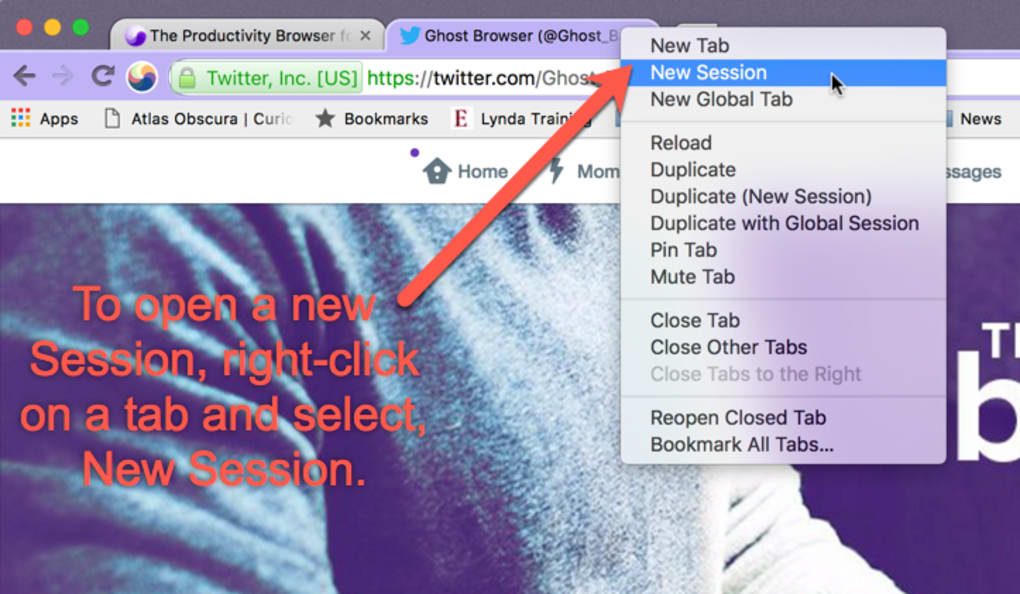
- Cookie Isolation per Tab: Each tab can run with its own cookie jar, enabling simultaneous logins to the same site with different credentials without cross‑contamination.
- Color‑Coded Tab Groups: Tabs that share the same cookie set are automatically highlighted with matching colors, reducing confusion when switching between accounts.
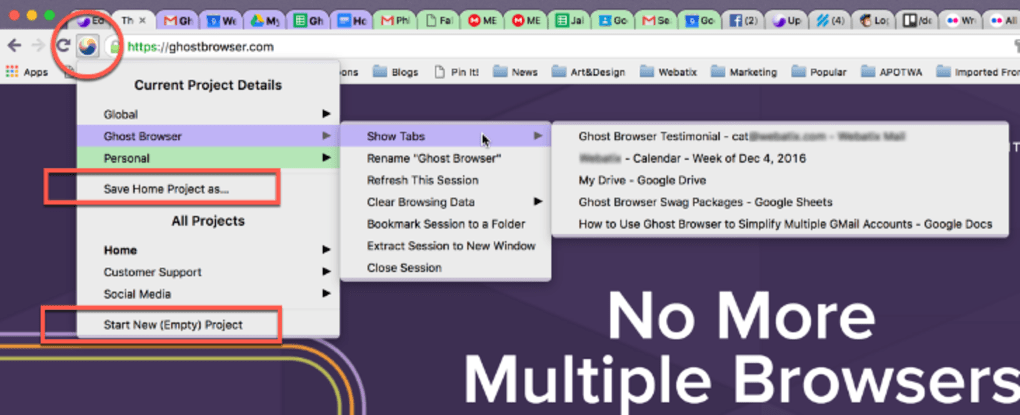
- Built‑in Session Manager: Save, export, and reload complete browsing sessions, making it easy to pause work and resume later without losing context.
- Chromium Core: Full compatibility with Chrome extensions, modern web standards, and fast rendering performance.
- Lightweight Sync: Optional cloud sync for bookmarks and settings, ensuring a consistent workspace across multiple devices.
- Secure Browsing: Regular security updates, sandboxed processes, and built‑in phishing protection keep your data safe while you multitask.
- Customizable UI: Adjust the width of the workspace bar, choose dark or light themes, and set keyboard shortcuts for rapid navigation.
Each of these features has been crafted with the modern professional in mind. The workspace sidebar eliminates the need to constantly switch between separate browsers or lose track of where a particular project lives. Cookie isolation, perhaps the most talked‑about feature, solves a problem that traditional browsers simply cannot address without cumbersome extensions or separate profiles. By integrating these capabilities directly into the core UI, Ghost Browser delivers a seamless, secure, and highly organized browsing experience that translates into measurable time savings.
Installation & Usage Instructions
Getting started with Ghost Browser is straightforward, whether you’re on Windows, macOS, or a Linux‑based system. Follow these steps to download, install, and configure your first workspace:
- Download the Installer: Visit the official Ghost Browser website and click the “Download for Windows” (or macOS/Linux) button. The file size is under 150 MB, ensuring a quick download even on moderate connections.
- Run the Installer: For Windows, execute the
.exefile and follow the on‑screen prompts. macOS users will open the.dmgpackage and drag the Ghost Browser icon into the Applications folder. Linux users can use the provided.debor.rpmpackage with their preferred package manager. - Initial Setup: Upon first launch, Ghost will ask if you’d like to import bookmarks from another browser. You can skip this step if you prefer a clean slate.
- Create Your First Workspace: Click the + Workspace button in the sidebar, name it (e.g., “Marketing Campaigns”), and start adding tabs. Use the New Tab icon within the workspace to open a page; each new tab inherits the workspace’s cookie container.
- Configure Cookie Isolation: Right‑click any tab and select “Isolate Cookies.” Ghost will assign a unique color to the tab and keep its login data separate from all others.
- Save Sessions: When you’re ready to pause work, click the “Save Session” icon at the top of the sidebar. Name the session, and Ghost will store all open tabs, cookie states, and scroll positions for later retrieval.
- Sync (Optional): If you subscribe to the premium plan, enable cloud sync in Settings → Sync. This will keep your workspaces, bookmarks, and saved sessions consistent across all devices.
The learning curve is minimal because Ghost mirrors Chrome’s familiar interface while adding the powerful sidebar. Most users report that after a single afternoon of use they have fully integrated Ghost into their daily routine, reducing the time spent juggling multiple browsers by up to 40 %.
Pros & Cons
Pros
- Workspace sidebar keeps tasks organized and always accessible.
- Cookie isolation enables true multi‑account management without extra extensions.
- Color‑coded tabs make it easy to visually differentiate sessions.
- Chromium base ensures compatibility with the vast Chrome extension ecosystem.
- Lightweight session manager saves and restores entire work environments.
- Regular security patches keep the browser safe for professional use.
Cons
- Free version limits the number of workspaces and advanced sync features.
- Some users report higher memory usage when many isolated tabs are open simultaneously.
- Workspace UI may feel intrusive for those accustomed to minimalist browsers.
- Linux support, while present, is not as polished as the Windows/macOS builds.
Overall, Ghost Browser strikes a compelling balance between functionality and performance. Its unique features cater directly to power users who need to manage multiple accounts and projects without the chaos typical of standard browsers. While the free tier imposes modest limits, the value delivered—especially in time savings—makes the upgrade to the premium plan a worthwhile consideration for businesses and freelancers alike.
Frequently Asked Questions
Can Ghost Browser run Chrome extensions?
Yes. Because Ghost is built on the Chromium engine, it supports virtually all Chrome extensions. You can install them from the Chrome Web Store just as you would in Google Chrome.
Is there a limit to how many isolated tabs I can open?
The free version allows up to 10 isolated tabs per workspace. Premium users enjoy unlimited isolated tabs, which is ideal for heavy multitaskers.
How does Ghost Browser protect my data?
Ghost receives regular security updates, uses sandboxed processes for each tab, and includes built‑in phishing and malware warnings. Cookie isolation also prevents cross‑site tracking between your accounts.
Can I sync my workspaces across multiple devices?
Yes, but only with a paid subscription. The sync feature stores your workspaces, bookmarks, and saved sessions in the cloud, allowing you to pick up exactly where you left off on any device.
Is Ghost Browser available for Linux?
A Linux version is provided as a .deb and .rpm package. While it offers the same core features, some UI refinements are still being optimized for the Linux ecosystem.
Conclusion & Call to Action
Ghost Browser delivers a targeted solution for professionals who need more than a standard web browser. Its workspace sidebar, cookie isolation, and session management tools translate directly into reduced tab fatigue, faster account switching, and clearer task organization. While the free tier is generous enough for casual power users, teams and freelancers who rely on heavy multitasking will quickly see the benefit of upgrading to the premium plan for unlimited workspaces and cloud sync.
Ready to reclaim your productivity? USD 0.00 – Download Ghost Browser now and start organizing your digital workload with a tool built for modern work habits.







